How to launch the cheat: step-by-step setup and every loader error explained
This page is the only one you need when a product refuses to start. It covers what to prepare before the first launch, what a normal launch looks like, what every loader error code means and what to do about it. Bookmark it — it is kept in step with the loader.
Before the first launch
Three things account for nine problems out of ten:
- Turn antivirus and Windows Defender fully off. Not "add an exclusion" — off, for the duration. The loader brings up its own hypervisor, and every real-time scanner reads that as a threat.
- Remove FACEIT Anti-Cheat if you have it. Its driver stays resident even with the client closed, and it blocks loading.
- Check virtualization in BIOS — VT-x on Intel, AMD-V on AMD. It is usually on already, but without it the product cannot start at all.
What exactly has to be present on the machine, and why, is covered separately: which libraries the cheat needs.
Five steps
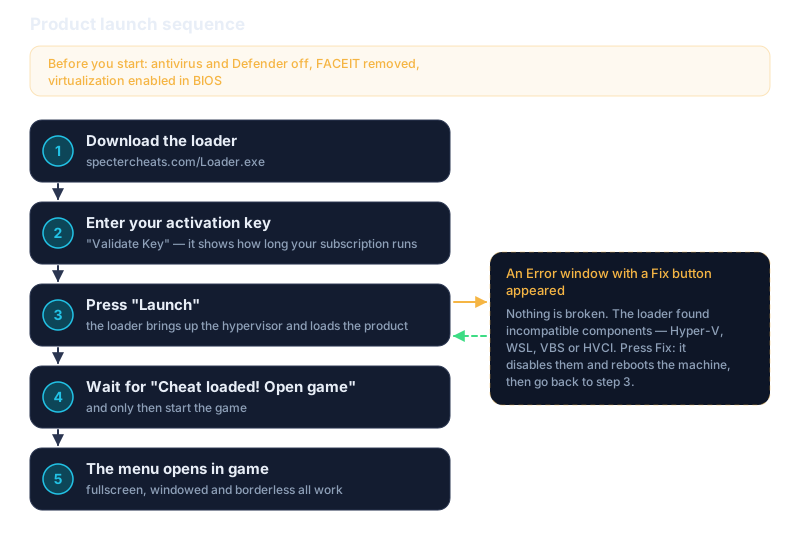
- Download the loader — spectercheats.com/Loader.exe. If the browser objects to the download, that is expected — see the antivirus point above.
- Run the loader and enter your activation key, then press Validate Key. On success a window opens with the product name, subscription status and expiry date — check they match what you bought.
- Press Launch. The loader starts bringing the product up. If an
Errorwindow with a Fix button appears instead, nothing is broken — see the next section. - Wait for "Cheat loaded! Open game". This is the part people skip: the game starts only after that line, never before.
- Start the game. The product menu opens inside it.
The product starts before the game. If the game is already open, close it and go back to step 3, or you will get
ERROR_OPENED_ANTICHEAT.
Display mode does not matter: fullscreen, windowed and borderless all work.
The Fix button is not an error
If pressing Launch opens a window titled Error with a Fix button at the bottom, the loader has found components in your system that its hypervisor cannot coexist with: Hyper-V, WSL, VBS or HVCI. This is deliberate — it is built-in auto-configuration, not a refusal.
Press Fix. The loader disables the incompatible components itself and reboots the machine. After the reboot, return to step 3 and the product will start. You only ever do this once.
The product loaded but there is no menu in game
The most common situation after a successful launch. The loader finished, "Cheat loaded" appeared, the game opened — and there is no overlay. The cause is almost always the same: the runtime libraries that drawing depends on are missing.
- Reinstall Visual C++. Download the all-in-one package, extract it to its own folder and run
install_all.batas administrator. - Reinstall DirectX. Start with the official Microsoft installer. If it fails, take the TechPowerUp build, extract it and run
#install.bat, letting it finish.
For what each layer is responsible for, see the libraries article.
Loader errors: code, cause, fix
An error code names the culprit rather than the symptom. Find yours in the right group — the fix is next to it.
Antivirus or FACEIT
| Code | What happened |
|---|---|
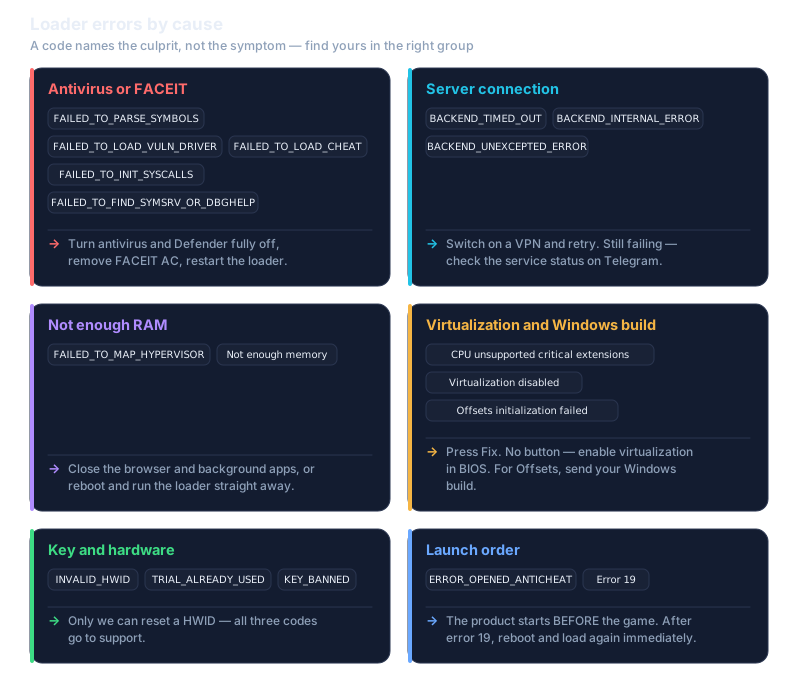
FAILED_TO_PARSE_SYMBOLS | Symbol parsing failed. Restart the loader; if it repeats, check antivirus and Defender. |
FAILED_TO_LOAD_VULN_DRIVER | The driver will not load. Check antivirus and FACEIT. |
FAILED_TO_LOAD_CHEAT | The program itself will not load. Check antivirus, DirectX and Visual C++. |
FAILED_TO_INIT_SYSCALLS | System call initialisation failed. Check antivirus and Visual C++. |
FAILED_TO_FIND_SYMSRV_OR_DBGHELP | Required components were not found. Check your connection, antivirus and FACEIT. |
One fix covers the whole group: turn antivirus and Defender fully off, remove FACEIT AC, restart the loader.
Server connection
BACKEND_TIMED_OUT, BACKEND_INTERNAL_ERROR, BACKEND_UNEXCEPTED_ERROR — the loader could not reach the product server. Most often this is blocking on the ISP side.
Fix: switch on a VPN and retry. If that does not help, check the service status on Telegram — maintenance may be running.
Not enough RAM
FAILED_TO_MAP_HYPERVISOR and "Not enough memory" mean the same thing: there is not enough free memory to place the hypervisor.
Fix: close the browser and background apps, or reboot and run the loader first, before anything else.
Virtualization and Windows build
- "CPU unsupported critical extensions" — Hyper-V, WSL, VBS or HVCI are enabled. The Fix button handles it. If there is no button, tell support so auto-disabling can be added to the loader.
- "Virtualization disabled or unsupported" — virtualization is off in BIOS. Enable it in your motherboard settings.
- "Offsets initialization failed" — unsupported Windows version. Send support your full build number. As of writing, builds up to 26H2 are supported.
Key and hardware
INVALID_HWID— the hardware id does not match. Only we can reset a HWID: write to support and we will clear the binding.TRIAL_ALREADY_USED— a trial key has already been used on this hardware. It only occurs with trial keys; contact support.KEY_BANNED— the key is blocked. Write to support to find out why.
Launch order
ERROR_OPENED_ANTICHEAT— an anti-cheat was running when the product started. Close every game that uses one and start the product before the game.- Error 19 — reboot the machine and load the product again immediately, without opening anything else first.
If none of this helped
Write to us — Discord and Telegram are the fastest. To get it solved on the first message, include:
- the exact error code or text;
- your full Windows version (
Win + R→winver); - which steps from this guide you have already tried.
Key replacement and refund rules are in the refund terms: if the product does not work through our fault, we replace the key or return the money.