Which libraries the cheat needs: Visual C++, DirectX and virtualization
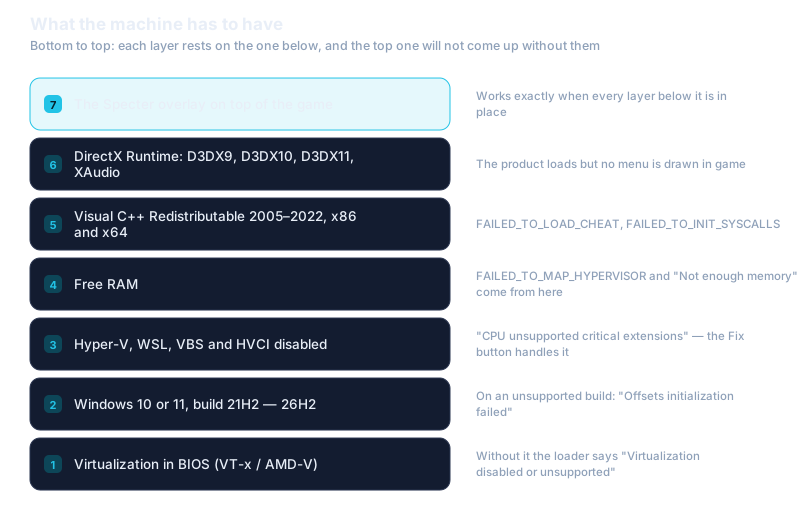
The Specter loader rests on several system layers, and each one produces its own recognisable error when it is absent. Below: what has to be installed, why it is needed, and which failure tells you that this particular layer is the one missing.
1. Virtualization in BIOS
The product runs through its own hypervisor, and a hypervisor needs hardware support: VT-x on Intel, AMD-V on AMD. Most boards ship with it on, but some vendors turn it off.
Quick check: Task Manager → Performance → CPU, the "Virtualization" line. If it says Disabled, enable it in BIOS — the setting is called Intel Virtualization Technology, SVM Mode or AMD-V.
Missing this layer: "Virtualization disabled or unsupported".
2. Windows build
The loader knows kernel offsets for specific Windows builds. Windows 10 and 11 are supported from 21H2 through 26H2 inclusive.
Check yours with Win + R → winver. On a build newer than the supported range the product will not start until the loader is updated — send us the number and it is usually turned around quickly.
Missing this layer: "Offsets initialization failed".
3. Hyper-V, WSL, VBS and HVCI disabled
These Windows components use hardware virtualization themselves and do not share it. While they are on, the loader's hypervisor cannot come up.
You do not need to disable them by hand: when the loader detects them it shows an Error window with a Fix button that turns them off and reboots the machine. It is a one-time setup.
To check in advance: in Windows Security it is "Memory integrity" (HVCI); in Windows Features it is "Hyper-V" and "Windows Subsystem for Linux".
Missing this layer: "CPU unsupported critical extensions".
4. Free RAM
The hypervisor needs a contiguous block of memory. On a loaded system there may simply not be one — especially with a browser holding dozens of tabs.
The practical answer: reboot and run the loader first, before the browser and messengers.
Missing this layer: FAILED_TO_MAP_HYPERVISOR, "Not enough memory".
5. Visual C++ Redistributable
The product is built in C++ and pulls in the Microsoft runtime. All versions are needed — 2005 through 2022 — and both architectures, x86 and x64. Half of the "it loaded but nothing works" reports come from exactly this: only the 2015+ x64 package is installed.
There is no point installing them one at a time; there is a bundle:
- Download the all-in-one Visual C++ package.
- Extract the archive into its own folder.
- Run
install_all.batas administrator and let it finish.
Missing this layer: FAILED_TO_LOAD_CHEAT, FAILED_TO_INIT_SYSCALLS.
6. DirectX Runtime
The overlay draws through Direct3D and needs the older redistributable libraries — D3DX9, D3DX10, D3DX11, XAudio. Windows 10 and 11 do not ship them: "DirectX 12 is already installed" refers to a different set of files.
Option 1. The official Microsoft web installer — download and run.
Option 2, if the first one errors out: the TechPowerUp build — extract and run #install.bat, letting it complete.
Missing this layer: the product loads, "Cheat loaded" appears, but no menu is drawn in game.
7. The overlay on top of the game
The top layer is the product itself. It works exactly when the six below it are in place. Display mode is irrelevant: fullscreen, windowed and borderless are all supported equally.
A quick check before you contact support
- Task Manager shows virtualization Enabled.
winverreports a build no newer than 26H2.install_all.batfrom the Visual C++ bundle ran as administrator.- The DirectX installer reached the end without errors.
- Antivirus and Defender are off, FACEIT is removed.
- The loader was started before the game.
If all six hold and the error is still there, it is covered in the launch and loader error guide. Still not there — write to Discord or Telegram with the error code and your winver output.